Add a “Copy” Button to all Squarespace Code Blocks
Want to start your own code blog?
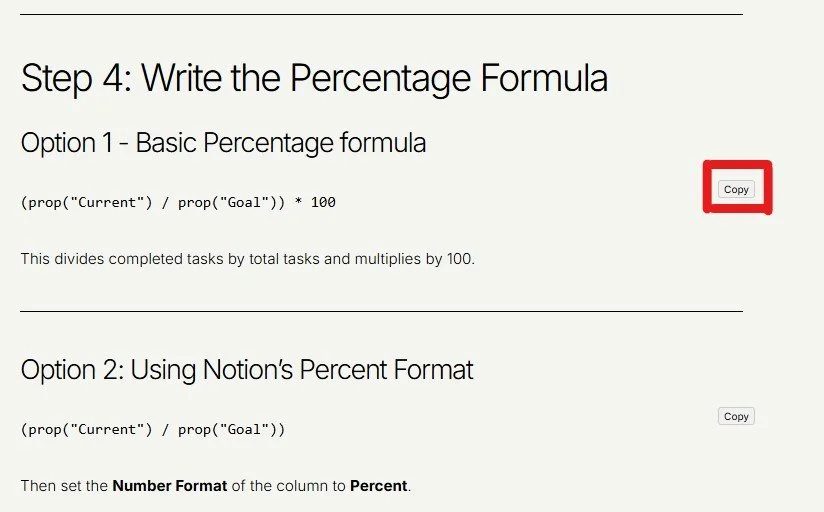
Want to make it easy for visitors to copy your code blog on Squarespace? With just a small tweak, you can add a tiny “Copy” button to the top-right corner of every code block on your site.
When the code block’s “Display Source Code” is turned ON, the code block background will turn white and the copy button will appear. Otherwise, it will not.

This means that any other code embeds used on the page will act as normal and will allow you to insert the example code in action above the code to copy if you wish.
Here’s how to add it:
Add the JavaScript
Add the code to the Blog where you need this.
Settings → Advanced → Page Header Code Injection and paste code:
<style>
/* Ensure the code block container is positioned relatively for the button */
.sqs-block-code {
  position: relative;
}

/* White background + padding only when code is visible */
.sqs-block-code pre {
  background-color: #fff;
  padding: 10px;
  border-radius: 4px;
  overflow: auto;
}

/* Copy button style */
.sqs-copy-button {
  position: absolute;
  top: 5px;
  right: 5px;
  font-size: 10px;
  padding: 2px 5px;
  cursor: pointer;
  border: 1px solid #ccc;
  border-radius: 3px;
  background-color: #f0f0f0;
  z-index: 10;
  opacity: 1; /* can also make hover-only if you want */
}
</style>

<script>
document.addEventListener('DOMContentLoaded', () => {
  // Only target code blocks with visible <pre> (Display Source Code ON)
  const codeBlocks = document.querySelectorAll('.sqs-block-code pre');

  codeBlocks.forEach(block => {
    if (block.parentElement.querySelector('.sqs-copy-button')) return;

    // Create button
    const button = document.createElement('button');
    button.className = 'sqs-copy-button';
    button.textContent = 'Copy';

    block.parentElement.appendChild(button);

    button.addEventListener('click', () => {
      navigator.clipboard.writeText(block.textContent).then(() => {
        button.textContent = 'Copied!';
        setTimeout(() => (button.textContent = 'Copy'), 1500);
      });
    });
  });
});
</script>
Check out our library of code snippets and site enhancements.
RELATED ARTICLES







Found this tutorial helpful?