Add a Countdown Timer anywhere on a page
Want to create urgency on your website? A countdown timer is a simple way to drive conversions for launches, promotions or events. This method lets you drop a timer anywhere on your page using a Code Block.
Note: You’ll need at least the Squarespace Business plan (or higher) to use Code Blocks and inject custom code.
How to use
Edit your page and insert a Code Block wherever you want the countdown timer to appear. Paste your countdown timer snippet directly into the Code Block.
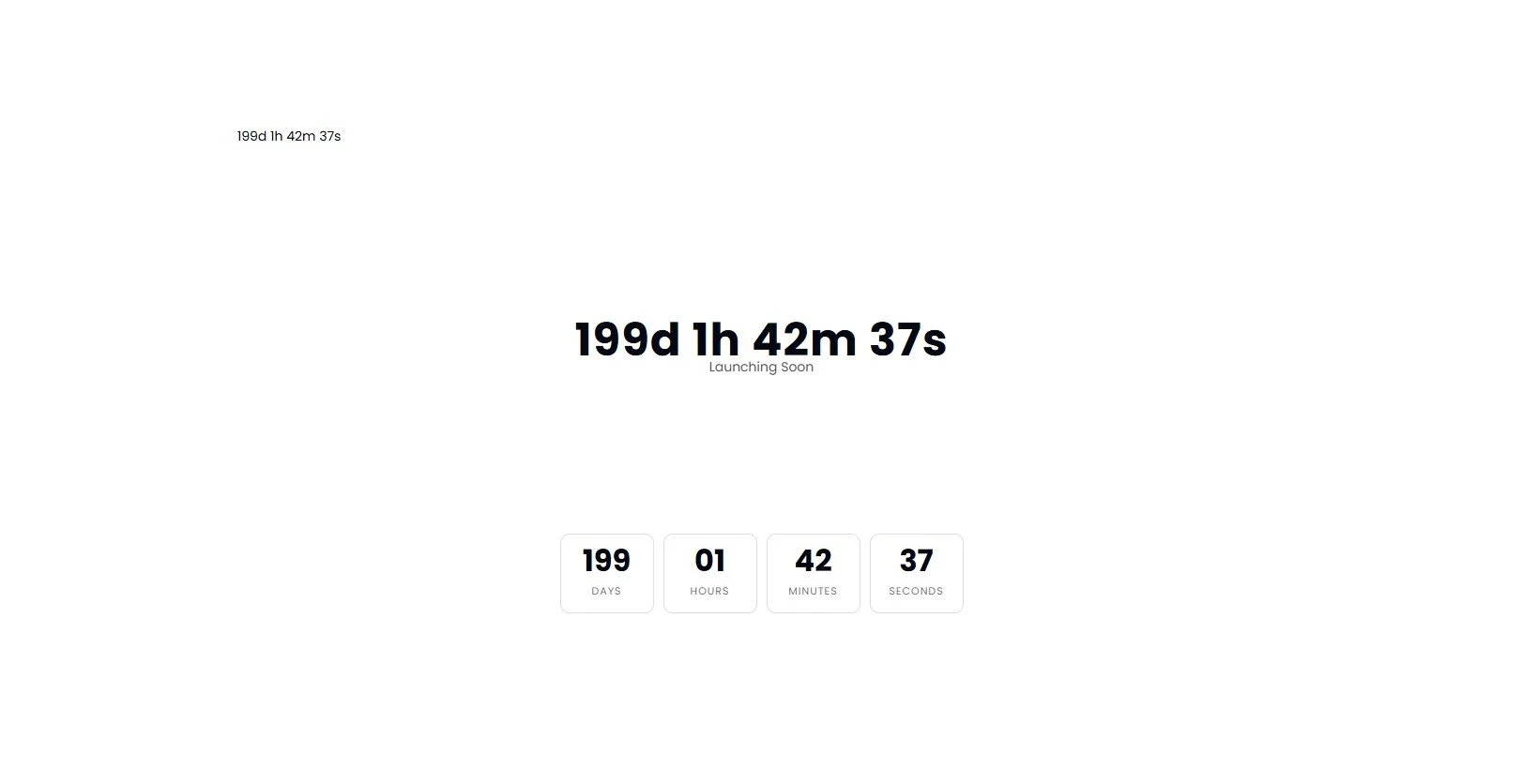
We have 3 examples below: plain un-styled, centred headline and ticker clock box style.
To adjust your time, just look for the code similar to: ( const target = new Date("2026-10-06T00:00:00Z").getTime(); ) and add the date and time you are counting down to. The time (00:00:00) is in hour:minute:second format to note what the specific time is.
Plain un-styled timer
<div id="countdown"></div>

<script>
const targetDate = new Date("2026-10-06T00:00:00Z").getTime();

setInterval(() => {
  const now = new Date().getTime();
  const diff = targetDate - now;

  if (diff <= 0) {
    document.getElementById("countdown").innerHTML = "Live";
    return;
  }

  const d = Math.floor(diff / (1000 * 60 * 60 * 24));
  const h = Math.floor((diff / (1000 * 60 * 60)) % 24);
  const m = Math.floor((diff / (1000 * 60)) % 60);
  const s = Math.floor((diff / 1000) % 60);

  document.getElementById("countdown").innerHTML =
    d + "d " + h + "h " + m + "m " + s + "s";
}, 1000);
</script>
Centred headline timer
This option would be great for sales pages.
<div class="countdown-wrap centered">
  <div id="countdown-1" class="countdown-time header-style"></div>
  <div class="countdown-label">Launching Soon</div>
</div>

<style>
/* CENTERED */
.countdown-wrap.centered {
  text-align: center;
  width: 100%;
}

/* HEADER STYLE (TIME) */
.countdown-time.header-style {
  font-size: 48px;
  font-weight: 700;
  letter-spacing: 1px;
}

/* Supporting label */
.countdown-label {
  margin-top: 8px;
  font-size: 14px;
  opacity: 0.7;
}
</style>

<script>
const target1 = new Date("2026-10-06T00:00:00Z").getTime();

setInterval(() => {
  const now = new Date().getTime();
  const diff = target1 - now;

  if (diff <= 0) {
    document.getElementById("countdown-1").innerHTML = "Live";
    return;
  }

  const d = Math.floor(diff / (1000 * 60 * 60 * 24));
  const h = Math.floor((diff / (1000 * 60 * 60)) % 24);
  const m = Math.floor((diff / (1000 * 60)) % 60);
  const s = Math.floor((diff / 1000) % 60);

  document.getElementById("countdown-1").innerHTML =
    `${d}d ${h}h ${m}m ${s}s`;
}, 1000);
</script>
Ticker clock box style
<div class="ticker-wrap">
  <div class="ticker centered">

    <div class="ticker-box">
      <div class="ticker-value" id="days">0</div>
      <div class="ticker-label">Days</div>
    </div>

    <div class="ticker-box">
      <div class="ticker-value" id="hours">00</div>
      <div class="ticker-label">Hours</div>
    </div>

    <div class="ticker-box">
      <div class="ticker-value" id="minutes">00</div>
      <div class="ticker-label">Minutes</div>
    </div>

    <div class="ticker-box">
      <div class="ticker-value" id="seconds">00</div>
      <div class="ticker-label">Seconds</div>
    </div>

  </div>
</div>

<style>
.ticker-wrap { width: 100%; text-align: center; }
.ticker.centered { display: flex; justify-content: center; gap: 10px; flex-wrap: wrap; }
.ticker-box { border: 1px solid #ddd; border-radius: 10px; padding: 12px 14px; min-width: 70px; background: #fff; }
.ticker-value { font-size: 32px; font-weight: 800; line-height: 1; }
.ticker-label { margin-top: 6px; font-size: 11px; text-transform: uppercase; letter-spacing: 1px; opacity: 0.6; }
</style>

<script>
document.addEventListener('DOMContentLoaded', function() {
  const targetDate = new Date("2026-10-06T00:00:00Z").getTime();

  const els = {
    days: document.getElementById("days"),
    hours: document.getElementById("hours"),
    minutes: document.getElementById("minutes"),
    seconds: document.getElementById("seconds")
  };

  function updateCountdown() {
    const now = new Date().getTime();
    const diff = targetDate - now;

    if (diff <= 0) {
      els.days.textContent = "0";
      els.hours.textContent = "0";
      els.minutes.textContent = "0";
      els.seconds.textContent = "0";
      return;
    }

    const d = Math.floor(diff / (1000 * 60 * 60 * 24));
    const h = Math.floor((diff / (1000 * 60 * 60)) % 24);
    const m = Math.floor((diff / (1000 * 60)) % 60);
    const s = Math.floor((diff / 1000) % 60);

    els.days.textContent = d;
    els.hours.textContent = String(h).padStart(2, "0");
    els.minutes.textContent = String(m).padStart(2, "0");
    els.seconds.textContent = String(s).padStart(2, "0");
  }

  updateCountdown(); // initial call
  setInterval(updateCountdown, 1000);
});
</script>
Check out our library of code snippets and site enhancements.